
Document exchange in the WorkOrderAgent: paperwork from customers, without email attachments.
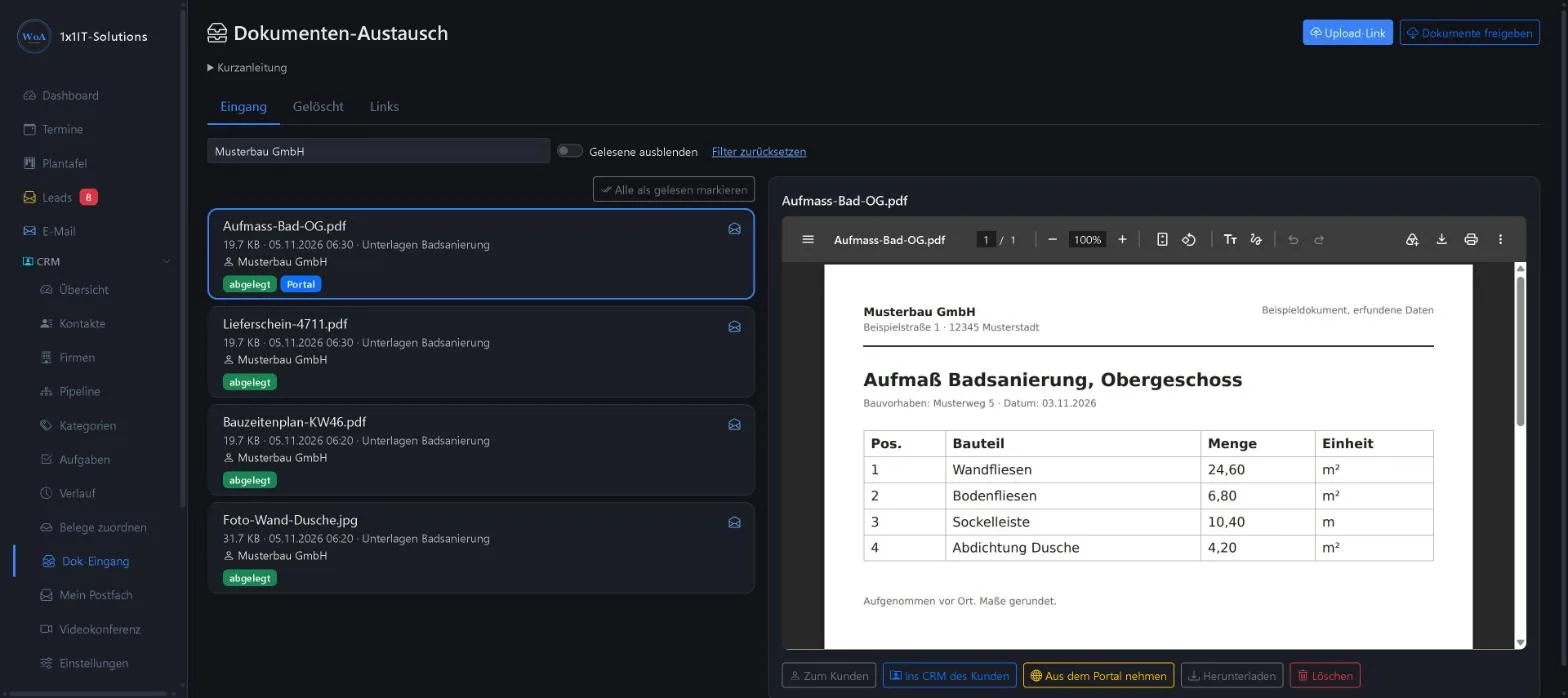
Exchange documents securely with customers, without email attachments. You create a link, your customer uploads, you check the files and file them with one click.
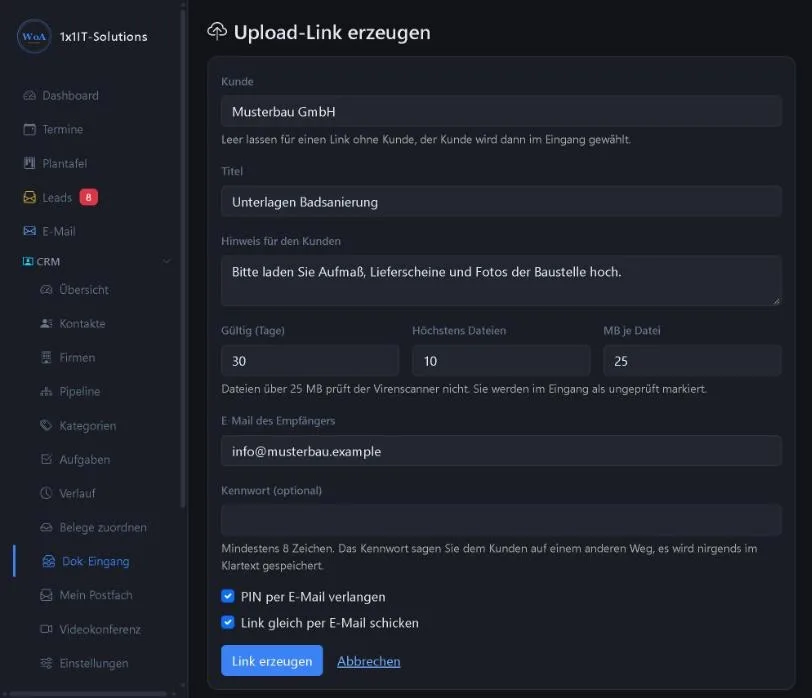
From link to filed document
Your customer needs no account and no app, just the link.
- Create a linkYou create an upload link for a customer or without a customer and set how long it is valid and how many files may come in.
- Pass it onCopy the link or send it by email straight from the WorkOrderAgent.
- Customer uploadsYour customer selects several files at once or takes photos with the phone camera, removes anything that doesn’t belong and then sends the files.
- Check and fileThe files arrive in the inbox. You look at them in the preview and file them with one click with the customer, in the CRM or in the DMS.
Settings for each link
What suits tax paperwork doesn’t have to apply to a site photo.
- Expiry date
- A link is valid for up to 90 days. After that it no longer accepts files.
- Password and PIN
- If you like, you protect the link with a password. You can also require that your customer receives a PIN by email before uploading.
- Number and size
- You set the maximum number of files and the size allowed for each, up to 45 MB per file.
- Revoke
- You can revoke a link at any time, even before it expires.
What your customer sees
A plain upload page, made for phones.
- No loginOpen the link, choose files, send. Your customer doesn’t need an account.
- Multiple selection and cameraSelect several files at once or photograph paperwork directly with the phone camera.
- Check first, then sendBefore sending, your customer sees the selection and removes files that don’t belong.
The inbox in the WorkOrderAgent
Nothing is filed until a member of staff has checked it.
- Preview
- View PDFs, images and text files directly in the inbox preview.
- Read status and filter
- The inbox shows what has already been read. The customer filter shows only what belongs to one customer.
- Filing with one click
- After the check, you file the document with the customer, in the CRM or in the DMS. If you like, you also make it available in the customer portal.
- Confirmation by email
- New documents trigger a confirmation by email. You adapt the designed email templates in the settings.
The other way round, too
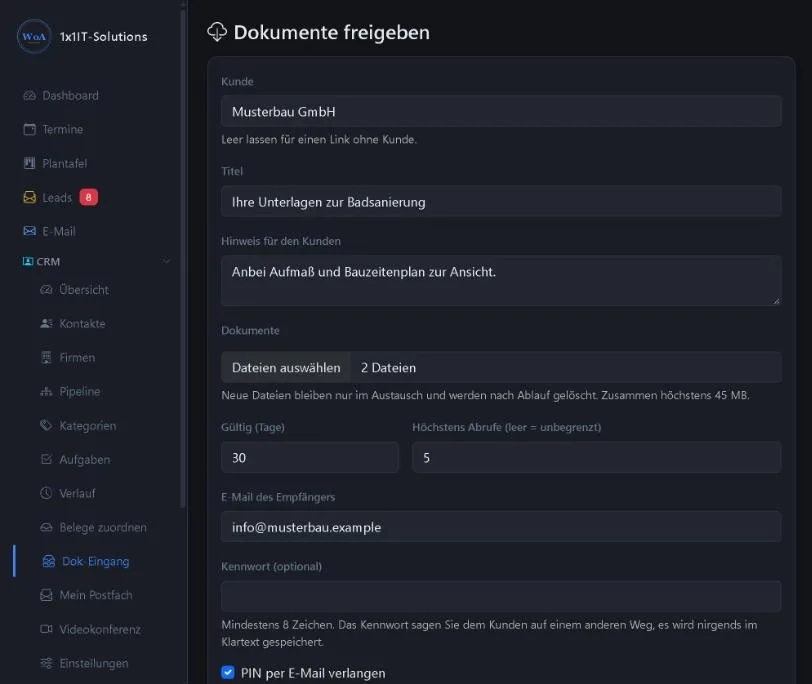
Documents your customer needs from you are shared by link as well.
- Sharing by link
- You share documents with an expiry date and, if you like, a password. A download log records when they were retrieved.
- Section in the customer portal
- The customer portal has a new section, “Dokumententausch” (document exchange).
What happens to the files
- Encrypted connection
- Uploads and downloads run over HTTPS.
- Encrypted until filed
- Uploaded files wait in encrypted form until a member of staff has checked and filed them. After that they sit in the WorkOrderAgent like any other document.
- File type and size
- On upload, the WorkOrderAgent checks file type and size. Uploads are logged with IP address and time.
- Virus check
- If the ClamAV virus scanner runs on the server, it checks files up to 25 MB.
Frequently asked questions
Does my customer need an account or an app?
No. Your customer opens the link in the browser, on a PC or a phone, and uploads without logging in. If you set a password or PIN, they enter it first.
Do the files go straight to the customer record or the DMS?
No. Everything arrives in the inbox first. A file is only filed once a member of staff has checked it, then with one click with the customer, in the CRM or in the DMS.
How large can the files be?
Up to 45 MB per file. You set the number of files and the size limit for each link.
Are files checked for viruses?
The WorkOrderAgent checks file type and size on every upload. A virus check with ClamAV covers files up to 25 MB if the scanner runs on the server. Larger files are not scanned.
Is it end-to-end encrypted?
No. The connection is encrypted with HTTPS, and files wait in encrypted form on the server until they are checked. Once filed, they are part of the normal WorkOrderAgent data.
Can my customer upload from abroad?
The WorkOrderAgent pages, including the upload page, can only be reached from approved countries.
What does document exchange cost?
Document exchange is an add-on module. We activate it per company; it costs €5.00 per month per company plus VAT.
Related
Collect paperwork without email attachments?
Request a free demo of the WorkOrderAgent or ask us about activating document exchange for your company.
0173 644 22 17