
Security alerts as leads: you know before the customer calls.
Every week the BSI reports new vulnerabilities. The WorkOrderAgent pulls high and critical warnings into your CRM every hour. You see early which vulnerability might affect your customers and get in touch with a solution instead of waiting for the emergency call.
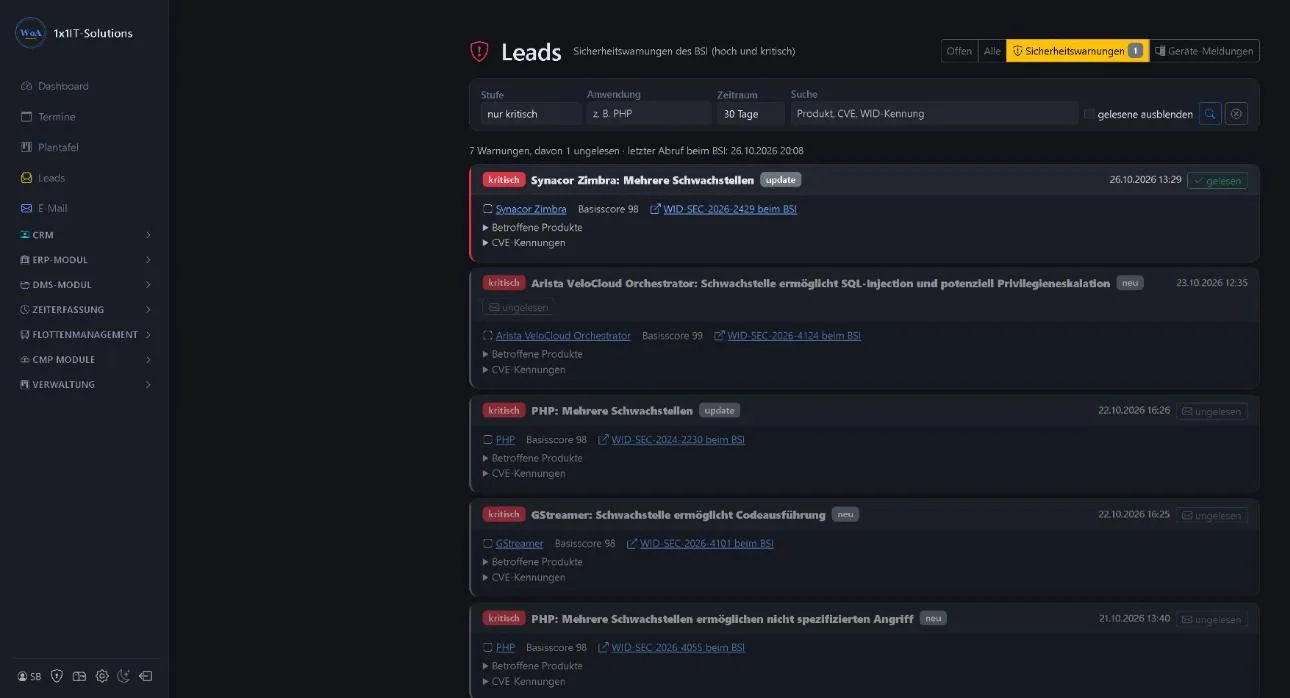
A warning becomes a conversation
The BSI warns of a critical vulnerability in a widely used mail server. You know that three of your customers run exactly this server. Instead of waiting, you call, offer the update and schedule an appointment.
For your customers it shows that someone is looking after them. For you it is a job that, without the warning, might only have come after the damage.
How you work with it
The warnings sit where you also handle enquiries.
- Own tab under leads
- Next to enquiries from the contact form you find the “Security alerts” tab. A counter shows how many critical warnings you have not read yet.
- Filtered quickly
- Filter by level, application and period, or search by product, CVE or WID identifier.
- Read status per user
- Everyone on the team sees which warnings they have already handled, so nothing gets lost when several colleagues use the list.
- Straight to the source
- Each warning links to the BSI notice, with affected products and CVE identifiers for a closer check.
To be honest
- No automatic matching
- The WorkOrderAgent does not match warnings against individual customers’ software. It brings the warnings to you; you judge who is affected with your knowledge of your customers.
- Only high and critical
- High and critical levels are included, so the list stays manageable and focuses on what really matters.
Frequently asked questions
Where do the warnings come from?
From the BSI’s warning and information service (WID/CERT-Bund). High and critical levels are included.
Does the WorkOrderAgent know which customer is affected?
No. There is no automatic matching against your customers’ software. You see the warning and decide whom to approach.
How often is it updated?
Hourly. Below the list you see when the BSI was last checked.
Are the warnings public too?
Yes, selected warnings with an assessment are on our security alerts page, also by email and push notification.
Related
Approach customers before anything happens?
Request a free demo and see the security alerts in the CRM.
0173 644 22 17